
Server management & ;commands
Broadcast, kick, ban, and DM from inside AwareCAD.
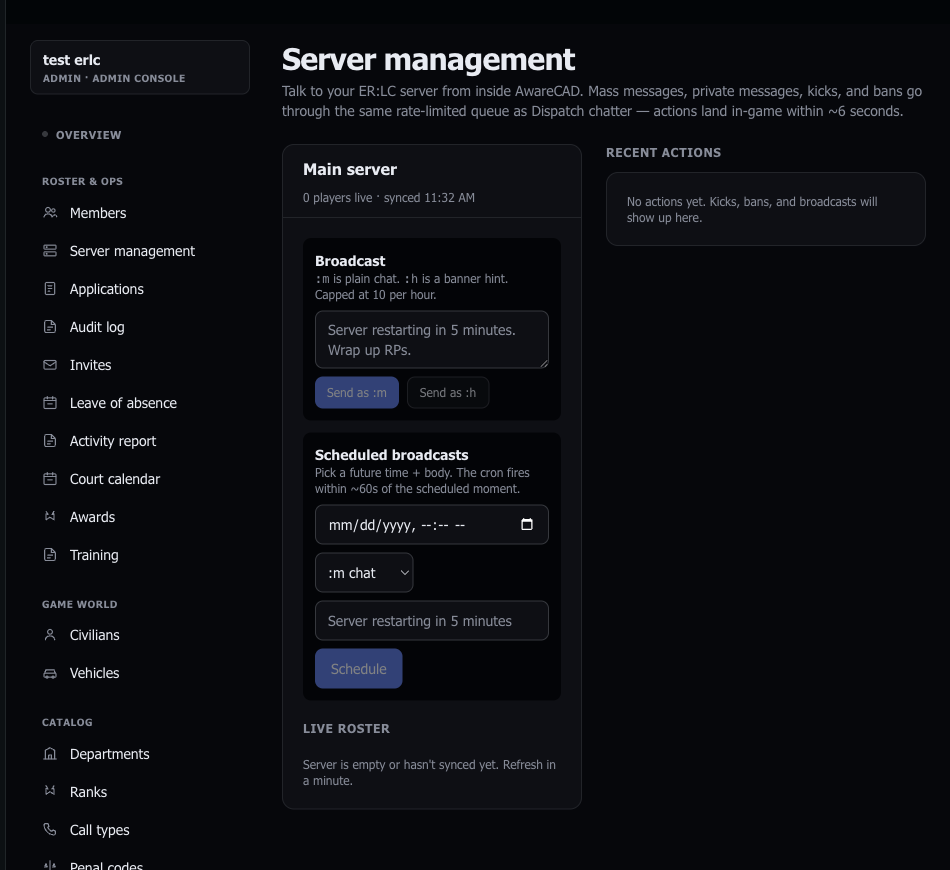
Once the ER:LC bridge is connected, AwareCAD can send PRC ;commands into your server on your behalf. Owners and admins run them from admin.awarecad.com/server-management instead of typing into game chat — every action is checked against your AwareCAD role and written to the audit log.
What's wired today
:m <message>— mass chat broadcast visible to every player. Best for shift-change announcements, downtime notices, RP-wide context.:h <message>— banner-style hint. More attention-grabbing than:m. Use sparingly.:pm <@user> <message>— direct message a single player. Good for staff check-ins without spamming the server.:kick <@user> <reason>— boot a player. The reason is required and saved to the audit log.:ban <@user> <reason>/:unban <@user>— permanent ban from your server and undo. Reason is required on bans.
Teleport is not wired — PRC supports it but we haven't shipped a UI for it yet. If you need it, file a ticket and we'll prioritize.
Who can do what
Permissions are enforced server-side in the enqueue_admin_action RPC, not just hidden in the UI — switching browsers or hand-crafting requests won't bypass them.
- Broadcast (`:m` / `:h`) — admins and above.
- DM (`:pm`) — admins and above.
- Kick — moderators and above.
- Ban / unban — admins and above (owners only for unban above a certain age, configurable).
See Departments & ranks for how the role ladder maps to titles in your community.
How commands get to your server
Actions don't fire instantly. PRC rate-limits the /v1/server/command endpoint to one call every five seconds, so AwareCAD writes each action into an outbound queue and drains it on a 5.5s cron. Worst case: 5–6 seconds between clicking Send and the message landing in-game. The Server Management page shows a "pending" indicator while queued.
Broadcasts (:m / :h) are also capped at 10 per hour per server to prevent spam — additional broadcasts beyond the cap are rejected with a clear error rather than silently queued.
Audit log
Every action is recorded in your community's audit log (admin.awarecad.com/audit-log) with the operator, action kind, target, reason, and timestamp. Bans and kicks include the in-game Roblox user ID when known, so the log survives username changes.
Troubleshooting
"My command hasn't gone through after a minute" — the bridge cron may have stalled. Check the dispatch HUD's "last polled" timestamp. If it's stuck more than two minutes, re-check your API key.
"I'm getting `Player not found`" — confirm the Roblox username (not display name) is spelled exactly. The picker autocompletes against your live roster — start typing and pick from the dropdown.
"The Server Management page is empty" — you need at least one ER:LC server registered under admin.awarecad.com/integrations.
Last updated May 19, 2026.