Discord guilds & auto-enroll
Map a Discord role to an AwareCAD rank.
Like Roblox group bindings, but for Discord. Map a Discord role (e.g. "Patrol Officer") to an AwareCAD rank, and members get their AwareCAD role assigned automatically.
Most communities run both bindings in parallel — Roblox for the in-game roster, Discord for the off-game / training side. Whichever gives a higher rank wins per the auto-enroll precedence rules.
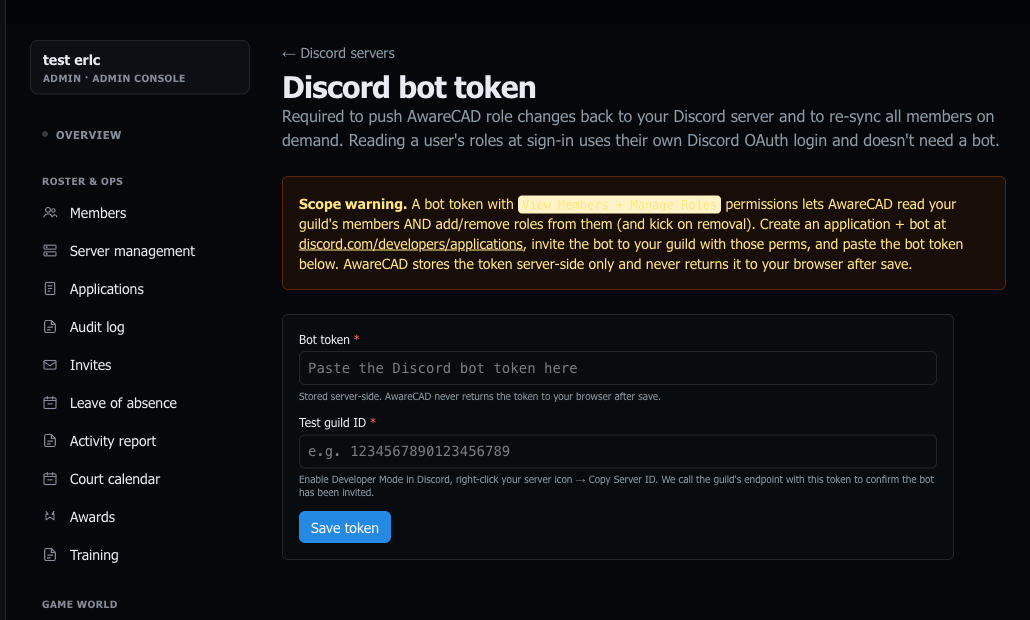
Bot token setup
- Create a Discord bot at discord.com/developers/applications. Add the bot to your server with the
View Server Memberspermission. - Copy the bot token (Bot → Reset Token).
- In AwareCAD, open
admin.awarecad.com/integrations→ Discord tab → Set bot token.
Bind a Discord guild
Paste the Discord server (guild) ID and pick the default department / role / rank, same as the Roblox binding flow.
Inside the binding, the role map lets you tie specific Discord roles to AwareCAD positions. Roles further down the list "win" when a member has multiple — match Discord's role hierarchy (top role wins) to keep behavior intuitive.
Sign-in flow
On AwareCAD sign-in, if the user has linked Discord (one-click OAuth from the link-discord page), the auto-enroll service reads their roles via the bot token and resolves them the same way Roblox bindings work.
Members who don't link Discord just don't get the Discord-side mapping applied — their other memberships (Roblox, manual invite) are unaffected.
Note on OAuth scopes
When a member links their Discord account, Discord asks them to grant three permissions on AwareCAD's behalf: their username, their email, and which guild roles they have on the servers they share with your bot. We use the email only for account contact; the role data drives auto-enroll. We never see message history, DMs, or voice activity.
Cross-references
For the underlying mechanics, see Roblox groups & auto-enroll — the Discord flow uses the same apply_discord_auto_enroll RPC shape and the same precedence model.
Last updated May 19, 2026.