
Roblox groups & auto-enroll
Map a Roblox group rank to an AwareCAD rank.
Link a Roblox group to AwareCAD so a player's group rank automatically becomes their AwareCAD rank. When you promote someone in your Roblox group, their AwareCAD role updates the next time they sign in — no invite token, no manual assignment.
Set up the Roblox API credential
AwareCAD uses Roblox's Open Cloud to read group rosters. You'll need an Open Cloud API key with the group:read scope and the group(s) you want to bind.
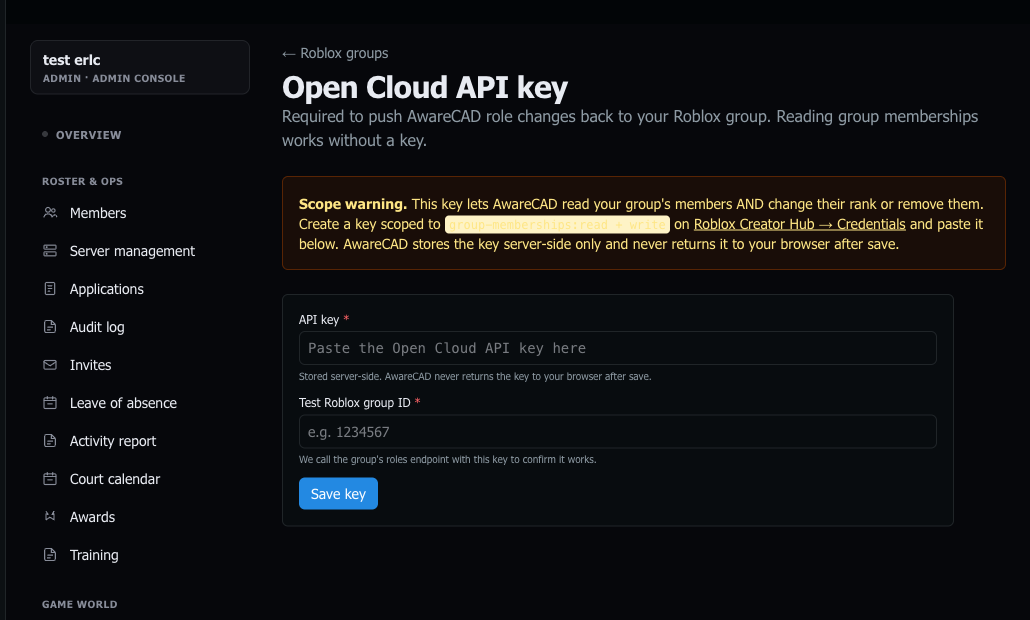
- On the Roblox creator dashboard, go to Credentials → API Keys.
- Create a key. Add the
groupAPI system, grant thegroup:readscope, and add your group(s) to the resource list. - Copy the API key. In AwareCAD, open
admin.awarecad.com/integrations→ Roblox tab → Set API key and paste it.
Bind a Roblox group to AwareCAD
- Click Add binding. Paste the group's Roblox ID (the number in the URL of the group page).
- Pick the default department for this group, the default role (officer / dispatcher / civilian), and an optional default rank. These apply when a member's Roblox group rank doesn't match a more specific row in the rank map.
- Click into the binding to see the rank map grid. Each Roblox rank (numbered 0–255 by Roblox) can map to a specific AwareCAD role, department, and rank — that's how a Lieutenant in your Roblox group becomes a Lieutenant in AwareCAD, but a Recruit stays a Recruit.
What happens when a user signs in
On every AwareCAD sign-in, the auto-enroll service:
- Reads the user's Roblox group memberships via Open Cloud.
- For each binding the user is in, resolves the rank → AwareCAD role/dept/rank.
- Upserts their
community_memberrow. - Removes them from communities they've left on the Roblox side.
Mappings are additive — if a user is in multiple bindings across multiple communities, they end up as a member of each one.
Gotchas
- Roblox API rate limits. If you have a large group (thousands of members), the first sync is slow. Subsequent syncs only re-read deltas via the Group Roles API.
- Group visibility. Your group has to be either public, or the API key has to have explicit access to it. Private groups without API access show "binding paused" in the UI.
- Civilian role gotcha. If a member's effective mapped role is
civilian, they can't fire;commandsfrom ER:LC — those require officer+ role. This is intentional; civilians shouldn't be able to open traffic stops.
Last updated May 19, 2026.