
ER:LC server bridge
Connect AwareCAD to your private ER:LC server.
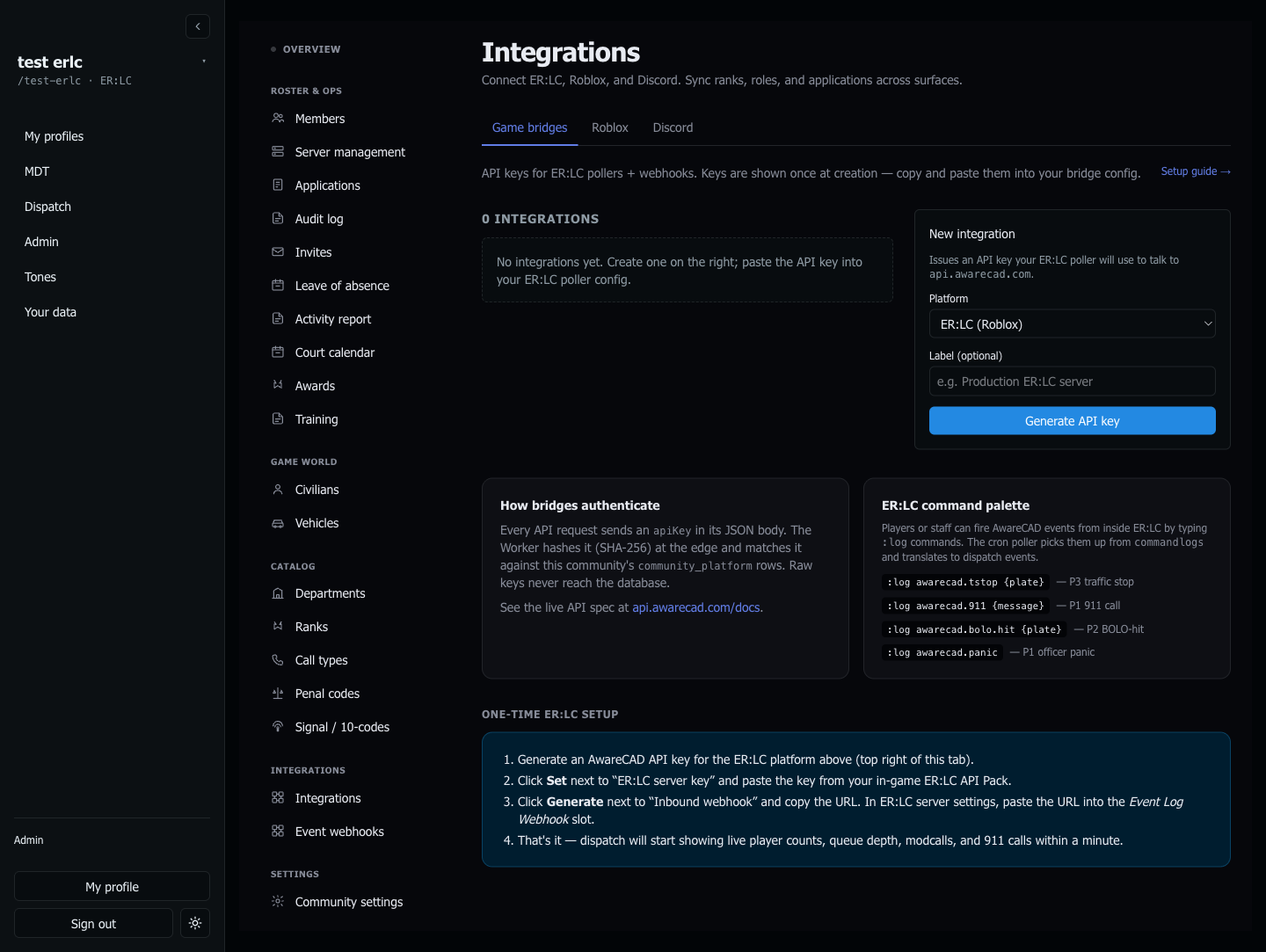
The ER:LC bridge is a two-way connection between AwareCAD and your private ER:LC server. AwareCAD polls your server every minute via the PRC API (player roster, vehicles, modcalls, emergency calls, kill logs) and your ER:LC server pusheswebhook events (911 calls, custom `;commands`) to AwareCAD as they happen. Both flow through the same API key pair — you set it up once.
What you need first
- Owner role in your AwareCAD community
- An ER:LC private server with the API Pack enabled (Game Pass purchase from PRC). The free public servers don't expose the API.
- Your ER:LC server key (from the in-game API Pack settings)
One-time setup
- Open
admin.awarecad.com/integrations→ Game bridges tab. - Click Generate API key. The key is shown once; copy it. AwareCAD stores only a SHA-256 hash, so we can't show it again — rotate if you lose it.
- Click Set next to "ER:LC server key" and paste your in-game API Pack key. AwareCAD's cron uses this to authenticate against PRC.
- Click Generate next to "Inbound webhook" and copy the URL. In your ER:LC server settings, paste it into the Event Log Webhook slot.
- Within 60 seconds you should see live player count + queue depth appear in the dispatch HUD. If not, see Troubleshooting below.
What gets synced
- Player roster (every ~60s) → updates which officers are "online in game" on the dispatch + MDT presence panes.
- Active vehicles → mirrored into AwareCAD for plate lookups in the MDT.
- Wanted status → AwareCAD warrants automatically set in-game wanted stars on the player.
- Emergency calls (911s) → fire into the dispatch queue with the caller, location, and (where the team is known) the primary responding department.
- `;commands` (officer-initiated) → `;tstop` opens a traffic stop, `;panic` opens a P1 officer-needs-backup, `;bolo`, `;backup`, `;robbery`, `;pursuit`, `;fire`, `;med`, `;ds` all map to call types. The officer is auto-assigned + put on-scene.
In-game commands cheatsheet
Any officer in your server can fire these by typing them into chat:
| Command | Creates | Priority |
|---|---|---|
| ;tstop {plate} | Traffic stop | P3 |
| ;bolo {plate} | BOLO sighting | P2 |
| ;panic | Officer panic | P1 |
| ;backup | Officer needs backup | P2 |
| ;robbery | Robbery in progress | P1 |
| ;pursuit {vehicle} | Pursuit | P1 |
| ;fire {location} | Fire | P1 |
| ;med {patient} | Medical emergency | P1 |
| ;ds {address} | Domestic disturbance | P2 |
Troubleshooting
"No data after 5 minutes" — re-check the server key (paste fresh; trailing whitespace breaks it), and verify the PRC API Pack is enabled on your private server. The dispatch HUD shows "last polled" — if it's never updated, the cron isn't reaching your server.
"911s land but `;commands` don't" — the officer's Roblox account isn't linked to their AwareCAD member, or their AwareCAD role is `civilian`. Check admin.awarecad.com/members.
"Calls go to the wrong department" — see Multi-agency call routing to map ER:LC teams to your AwareCAD departments.
Last updated May 18, 2026.