The dispatch console
The 2x2 console, SLA aging, multi-agency lanes.
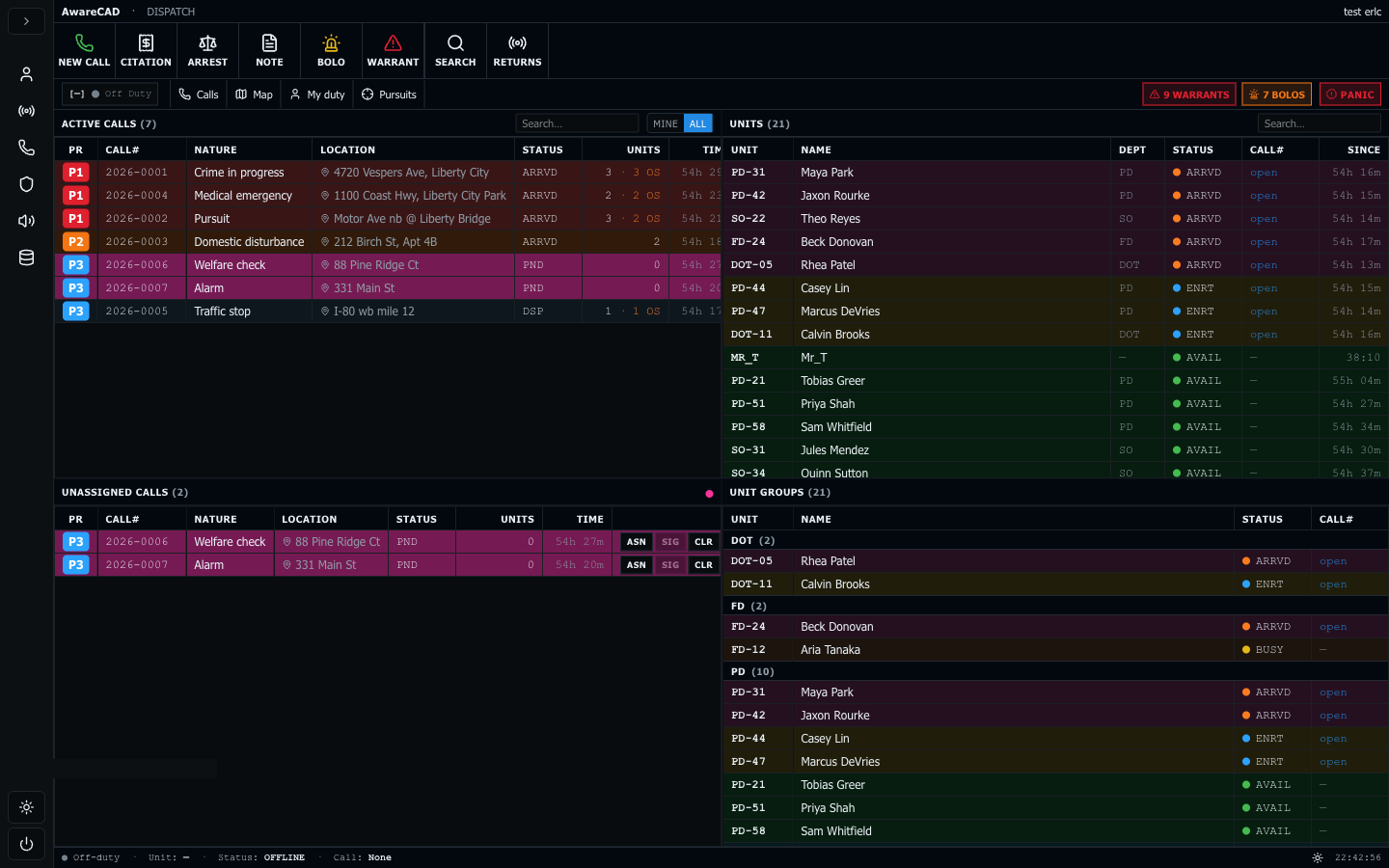
The dispatch console at dispatch.awarecad.com is a legacy-CAD 2×2 grid for coordinating calls and units across the community. Designed for "dispatcher in the chair, not on the ground" — sees everything by default.
Layout
Four panels:
- Active Calls (top-left) — every call not yet cleared / cancelled. Status-tinted rows. Search-as-you-type.
- Units (top-right) — all officer-level community members, status-tinted (green available, yellow en route, pink on scene, gray off-duty).
- Unassigned Calls (bottom-left) — subset of Active that nobody's taken. Aging tint goes hot-pink when P1 sits 1+ min, P2 sits 5+ min, P3 sits 15+ min — drives attention to stalled calls.
- Unit Groups (bottom-right) — units grouped by department for quick survey of who's on what.
Active Calls panel
Search at the top filters by call number, type, or location. Click a row → opens the call in the MDT in a new tab. Right-click for the context menu (Open, Take, Mark on scene, Clear, Cancel, Copy ID, Reopen).
The ASN / SIG / CLR / POP buttons on the right of each row are the dispatcher's actions:
- ASN — assign a unit. Pick from the on-duty roster.
- SIG — set/clear a signal code on the call.
- CLR — close the call with a disposition.
- POP — pop the call into a detached window so you can keep the main grid clear.
SLA aging
When an unassigned call sits past its priority threshold (P1: 60s, P2: 5 min, P3: 15 min, P4: 30 min), the row tint flips to a hot pink. Strong visual cue to act on stalled work. Once assigned, the aging timer stops (the assignment timer carries the urgency from there).
Multi-agency dispatch
If your community runs multiple departments, the Active Calls and Unassigned panels have a Mine / All toggle in the header. Dispatchers default to All (you're agency-universal), but you can narrow to a specific department's lane when you're handling one stream.
The New Call drawer (action ribbon → New Call) has a primary department + responding agencies picker. The primary auto-fills from the chosen call type's default department. See Multi-agency call routing for the full model.
Outbound dispatch (in-game broadcast)
Configure templated chatter for the ER:LC bridge. When a call is created, a unit assigned, or a call cleared, AwareCAD can send a message into your private server's chat. Templates support variables: {call_number}, {type}, {address}. Configure from admin/integrations → Game bridges → outbound dispatch.
Last updated May 18, 2026.