
The MDT cockpit
Tabs, lookups, the active-calls pane.
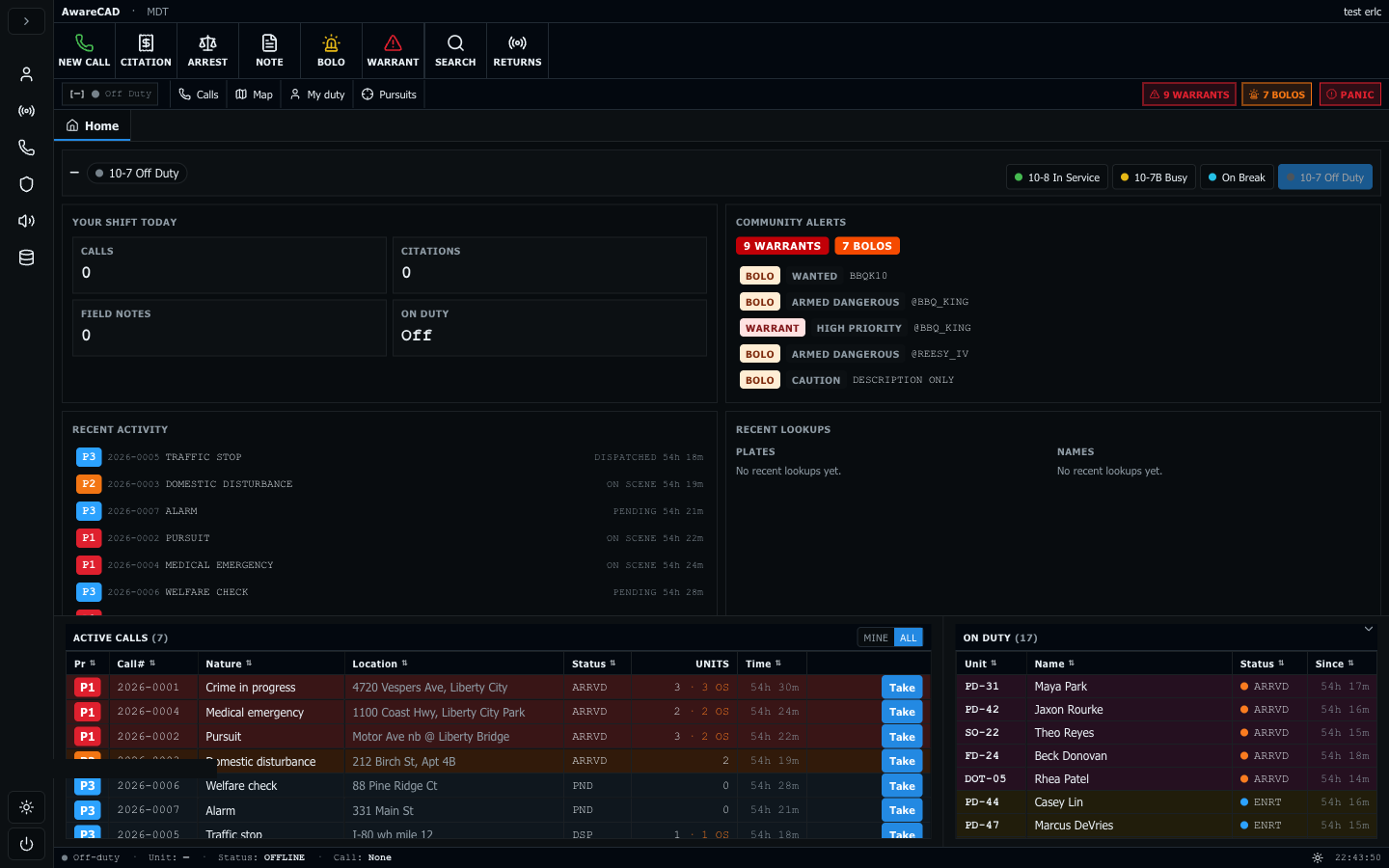
The MDT at mdt.awarecad.com is your home base on shift. The layout is a workspace on top with tabbed lookups + record creation, and a bottom dock split between live active calls and the on-duty roster. The dock is drag-resizable; collapsing it gives the workspace more room.
Tabs
Click the + on the tab bar to open a new tab. Tabs persist for the session: Home (the toolkit), Returns (plate/name lookups), Civilian / Vehicle detail (after you click a row), New Citation / New Arrest / New BOLO / New Field Note / New Warrant (forms), Call Detail (after clicking a call row).
Keyboard shortcuts: Alt+1..9 jumps to tab N (Home is 1), Alt+W closes the active tab (Home is protected), Alt+Left/Right cycles to the adjacent tab, Esc closes the active tab (skipped on Home), and / opens the universal lookup modal — type a plate or name, hit Enter, and the Returns tab opens with the result.
Active Calls pane (bottom-left)
Every active call in the community, ordered by priority then age. Status-tinted rows: red for P1, orange for P2, light blue for P3, gray for P4. Status column shows PND (pending), DSP (dispatched), or ARRVD (on-scene).
Take a call. Click the Take button on the row. After taking, the row morphs into On Scene / Note / Clear actions. Realtime keeps everyone's pane in sync — when you take, other officers see the unit count tick up.
Right-click any row for the context menu: Open, Take, On Scene, Clear my assignment, Copy call ID, Open in new tab. Dispatchers also see Reopen / Cancel. The menu hides items that don't apply to current state — once you've taken a call, Take stops appearing.
In multi-agency communities, the pane has a Mine / All toggle in the header — see Multi-agency call routing.
Lookups (Returns tab)
Hit / anywhere outside a text field to open the lookup modal — type a plate or name and press Enter. The Returns tab opens with the result populated. Each lookup is a card — drill into vehicle details, the owner civilian, recent citations, BOLOs against the plate.
Live ER:LC vehicles show in the lookup — these are vehicles spawned in your private server's current session (mirrored every ~60s by the bridge poller). Plate lookups against an ER:LC-active vehicle return immediately even if it isn't yet registered against a civilian.
Custom right-click context menu
MDT and Dispatch override the browser right-click menu with CAD- specific actions on every entity (calls, civilians, vehicles, officers). Text inputs and contenteditable fields keep the native menu (paste / spellcheck / dictionary). Hold Shift while right-clicking anywhere to force the native menu — useful for "Inspect" while debugging.
On Duty pane (bottom-right)
Officers currently signed in and not off-duty. Status dot color mirrors the row: green = available, yellow = en route, pink = on scene, etc. "Since" column ticks live.
Last updated May 18, 2026.